
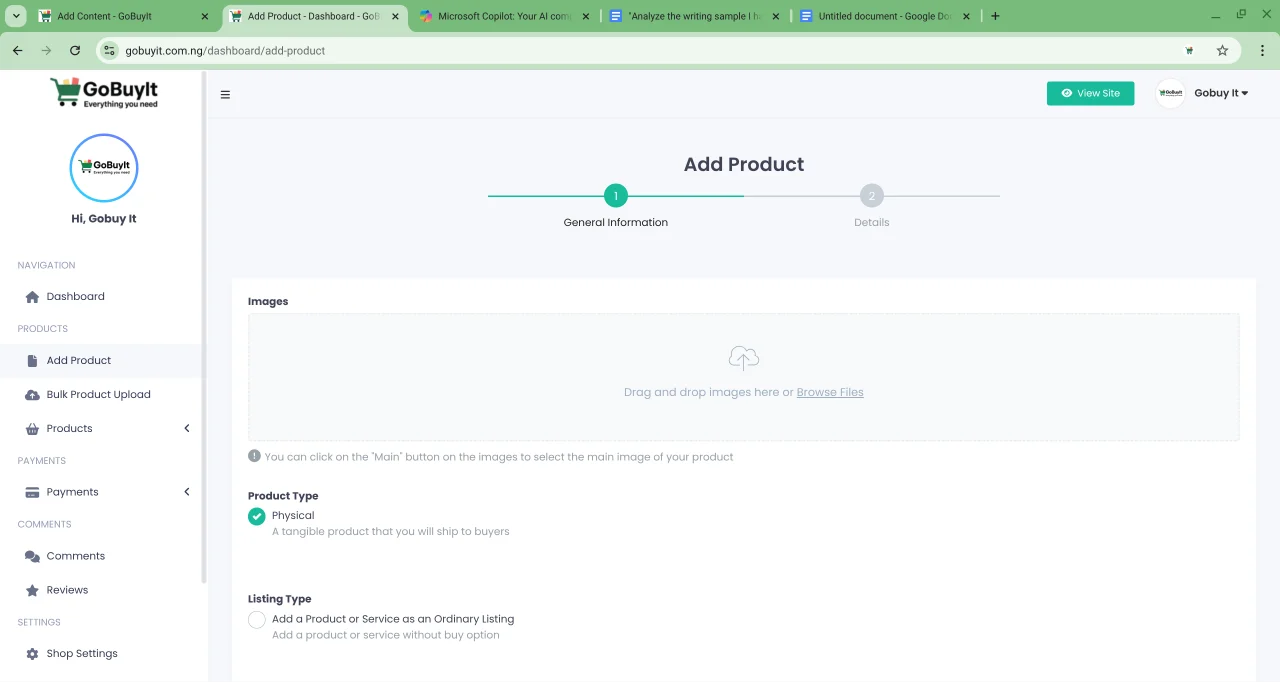
Selling on GoBuyIt starts with one simple step: adding your product. Whether it’s a physical item or a digital service, the platform makes it easy to get your listing live.
Let’s walk through it.
Step 1: Click “Sell Now”
-
On desktop: Click the green SELL NOW button at the top of the site.
-
On mobile: Tap the menu icon (three bars), then tap Sell Now.
This opens the Add Product page.
Step 2: Upload Your Images First
At the top of the form, you’ll see the Images section. You can:
-
Drag and drop your product photos
-
Browse files to upload
-
Click the Main button on one image to set it as your primary display photo
Good images make a big difference. Use clear, well-lit photos that show your product from multiple angles.
Step 3: Fill Out General Information
Choose your:
-
Product Type:
-
Physical — for items you’ll ship or hand over
-
Digital — for downloadable products or services
-
Listing Type:
-
Ordinary Listing — post without a buy button
-
Category: Select the most relevant category for your product
Step 4: Add Product Details
Fill in the following fields:
-
Title — Give your product a clear, searchable name
-
Short Description — A quick summary of what you’re selling
-
Tags — Add keywords to help buyers find your product (type and hit enter)
-
Full Description — Write a detailed explanation of the product
Click Save and Continue to move to the next section.
Step 5: Enter Pricing and Location
-
Brand (optional)
-
Condition (optional) — New, Used, Refurbished
-
SKU — Your product code
-
Price — Enter the amount in Nigerian Naira (₦)
-
Discounted Price — Leave blank if there’s no discount
-
Video Preview — Upload an MP4 or WEBM video if needed
Then add your location:
-
State
-
Address
-
Zip Code (If you leave this blank, your shop’s default location will be used.)
Step 6: Agree and Submit
Check the box that says:
I have read and agree to the Terms & Conditions.
Then choose:
-
Save as Draft — if you want to finish later
-
Submit — if you’re ready to publish
Final tip
Start strong with great images, a clear title, and honest details. The better your listing looks, the faster it sells.
Next up: how to upload products in bulk. Let’s keep going.