
Found something you like? Great. Now it’s time to reach out and talk to the seller.
Whether you want to ask a question, negotiate the price, or arrange a meetup, contacting the seller is easy.
Let’s walk through it.
Step 1: Open the Product Page
Click on the item you’re interested in. This will take you to the Product Details page.
Here, you’ll see everything you need to know — photos, description, price, location, and more.
Step 2: Click “Contact Seller”
On the product page, look for the Contact Seller button. It’s usually right below the product info.
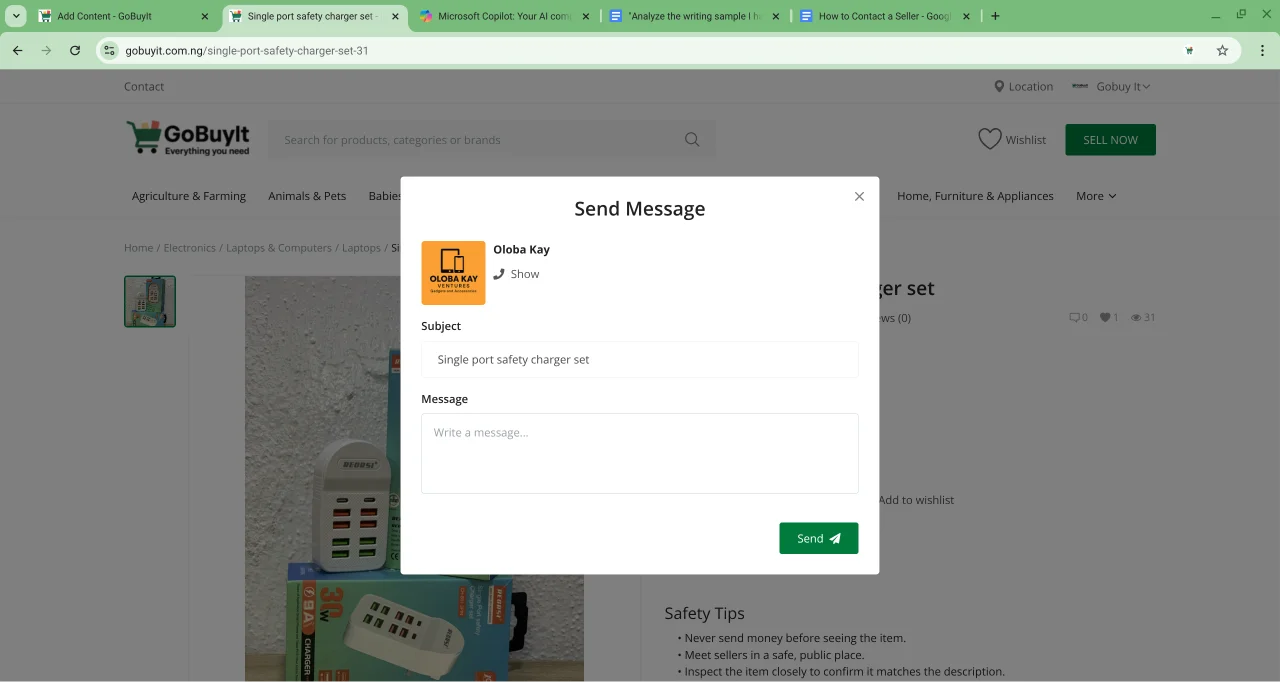
Click it, and a contact form will pop up.
Here’s what you’ll see:
-
Send Message
-
Seller Name — For example: Oloba Kay
-
Subject — This will auto-fill with the product name, like Single port safety charger set
-
Message Box — This is where you write your message. Be polite, clear, and direct.
Type your message, then hit Send.
Can you call the seller?
If the seller has chosen to show their phone number, you’ll see it right there on the contact seller form click on the ‘Show’ under the seller name, this will show the seller phone number. Not all sellers do this, so if you don’t see a number, just use the message form.
Tips for Messaging Sellers
-
Ask about the condition, availability, or location
-
Confirm the price or negotiate politely
-
Suggest a safe place to meet if you’re ready to buy
Keep it respectful. Sellers are more likely to respond when your message is clear and friendly.
Once you’ve sent your message, wait for the seller to reply. You’ll get a notification in your dashboard when they do.
Next up: how to spot a good deal. Let’s keep going.