
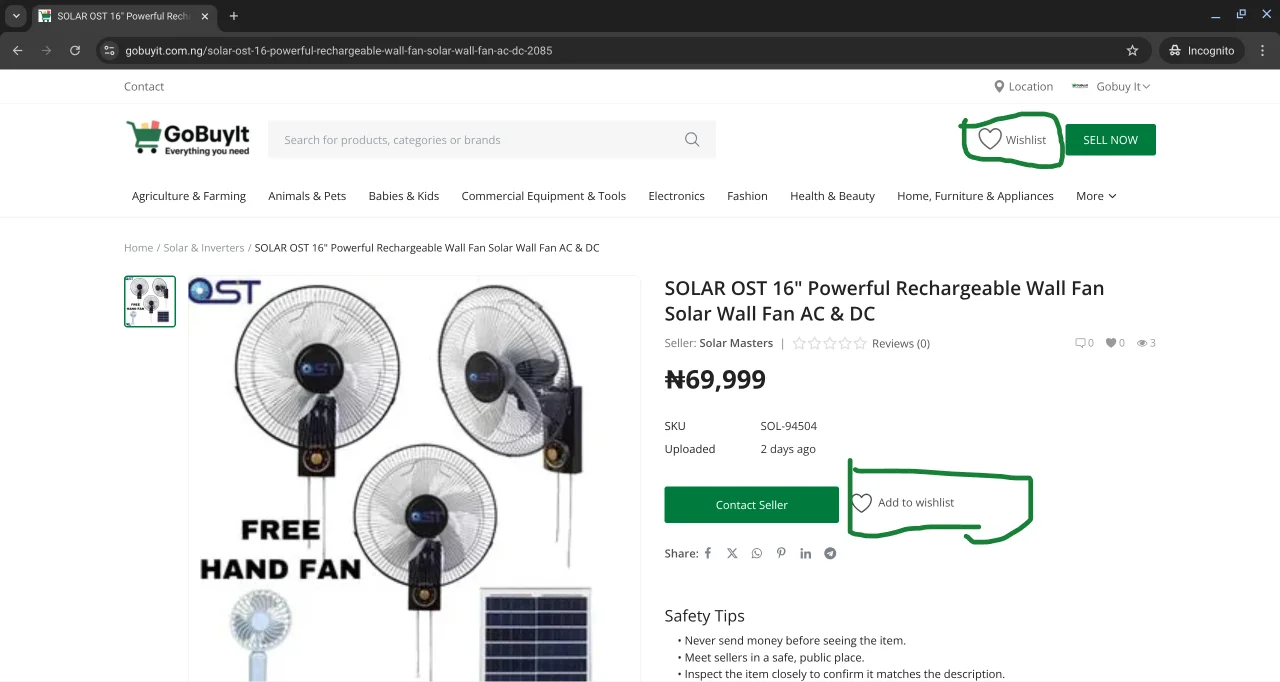
Found something you like but not ready to buy yet? GoBuyIt makes it easy to keep track of items by adding them to your wishlist.
Here’s how it works.
Why use the wishlist?
Sometimes you want to:
-
Compare a few options before deciding
-
Wait for payday
-
Ask a friend for advice
-
Contact the seller later
Adding a product to your wishlist keeps it saved in your account so you can come back to it anytime.
How to add a product to your wishlist
When you’re viewing a product page, look for the Add to Wishlist button. It’s usually near the product title or price.
Click it once. That’s it. The item is now saved to your wishlist.
Where to find your wishlist
To view your saved items:
-
On a laptop: Click your name at the top right, then select Wishlist from the dropdown.
-
On mobile: Tap the menu icon (three bars at the top left), then tap Wishlist.
You’ll see a list of everything you’ve added. Click any item to revisit the product page.
Can you remove items from your wishlist?
Yes. Just go back to the product page and click Remove from Wishlist to take it off your list.
Final tip
Use your wishlist to stay organized. Whether you’re buying today or next week, it’s a smart way to keep track of what you love.