
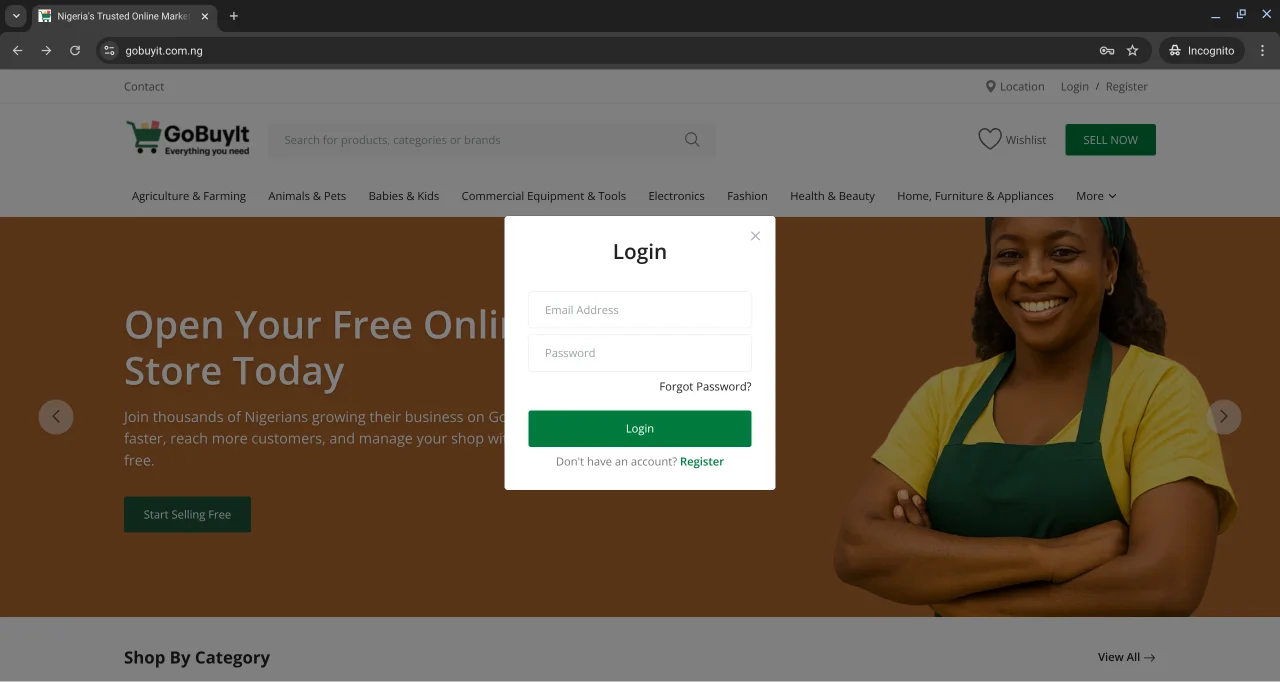
Alright, you’ve created your GoBuyIt account — now let’s make sure you know how to get in and out of it safely.
Logging in is simple. Logging out is just as easy. Let’s walk through both.
How to Log In
No matter what page you're on, you’ll always find the Login/Register button.
-
On a laptop: Look to the top right corner of the screen. You’ll see it sitting there, waiting for you.
-
On mobile: Tap the menu icon — that’s the three stacked bars at the top left. Then tap Login.
Once you click Login, you’ll see a form that asks for:
-
Email Address Use the one you registered with.
-
Password Type it in carefully. If you’ve forgotten it, click Forgot Password? and follow the steps to reset.
-
Don’t have an account? Click Register to sign up. We’ve got a guide for that too.
Hit Login and you’re in.
How to Log Out
Done browsing or selling for the day? Logging out keeps your account secure — especially if you’re on a shared device.
Here’s how:
-
On a laptop: Click your name or profile icon at the top right. You’ll see a dropdown. Select Log Out.
-
On mobile: Tap the menu icon again. Scroll down and tap Log Out.
Boom. You’re out.
Why it matters
Logging out isn’t just a habit — it’s a smart move. It protects your account from unauthorized access and keeps your personal info safe.
So next time you’re done using GoBuyIt, take that extra second to log out. Your future self will thank you.
Need help logging in or resetting your password? We’ve got you covered in the next article. Let’s keep going.