
Ready to start buying or selling on GoBuyIt? First things first — you’ll need an account. Don’t worry, it’s quick, easy, and totally free.
Let’s walk through it together.
Where to find the Register button
-
On a laptop: Look at the top right corner of any page. You’ll see Login / Register. Click Register to get started.
-
On mobile: Tap the menu icon — that’s the three stacked bars at the top left. Then tap Register from the dropdown menu.
This will take you to the registration page.
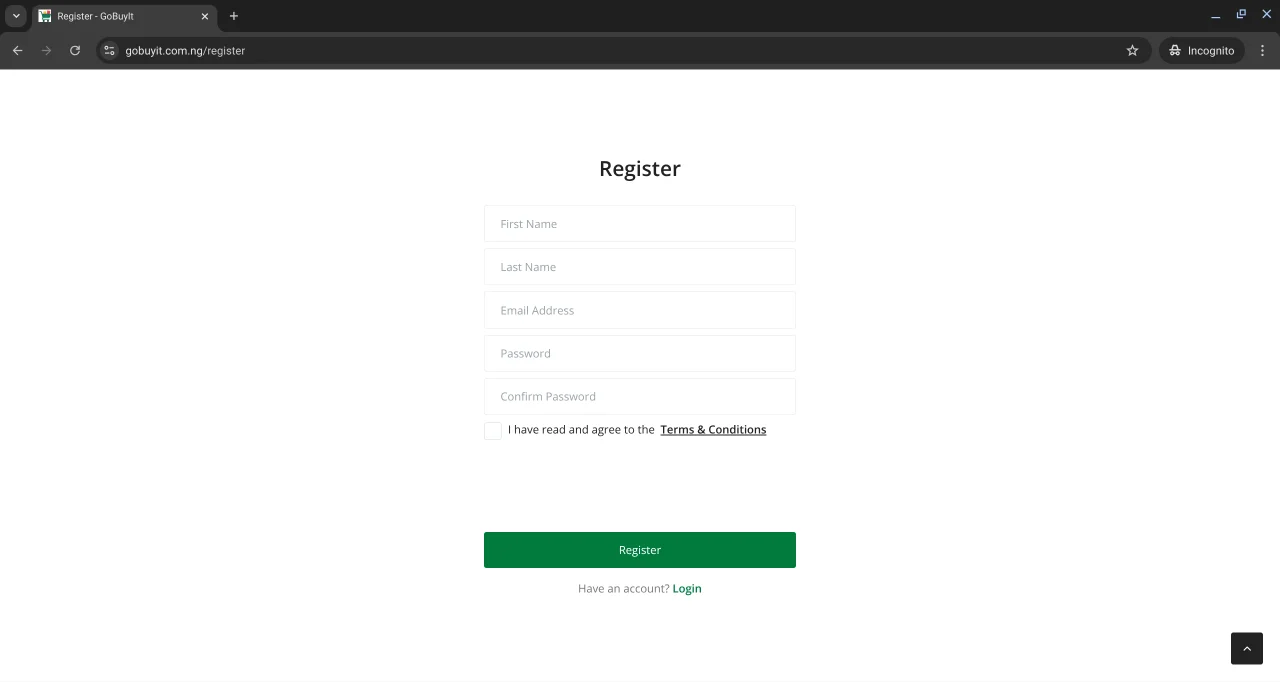
What’s on the registration form?
Once you’re on the page, you’ll see a simple form asking for:
-
First Name Use your real name. It helps build trust with other users.
-
Last Name Same here. Keep it real.
-
Email Address This is where you’ll get notifications, messages, and updates. Make sure it’s active and correct.
-
Password Choose something secure but easy for you to remember. You’ll need it to log in later.
-
Confirm Password Just type the same password again to make sure there are no typos.
-
Terms & Conditions Tick the box to confirm you’ve read and agreed to the rules. It’s standard stuff — nothing sneaky.
Once you’ve filled everything out, hit Register.
That’s it. You’re in.
Already have an account?
If you’ve signed up before, just click Login at the bottom of the page and enter your email and password.
What happens next?
After registering, you’ll be taken to your dashboard. From there, you can:
-
Post your first ad
-
Browse listings
-
Chat with buyers or sellers
-
Update your profile
You’re officially part of the GoBuyIt community.
Let’s get selling. Or buying. Or both.