
So you’ve logged in. Now what?
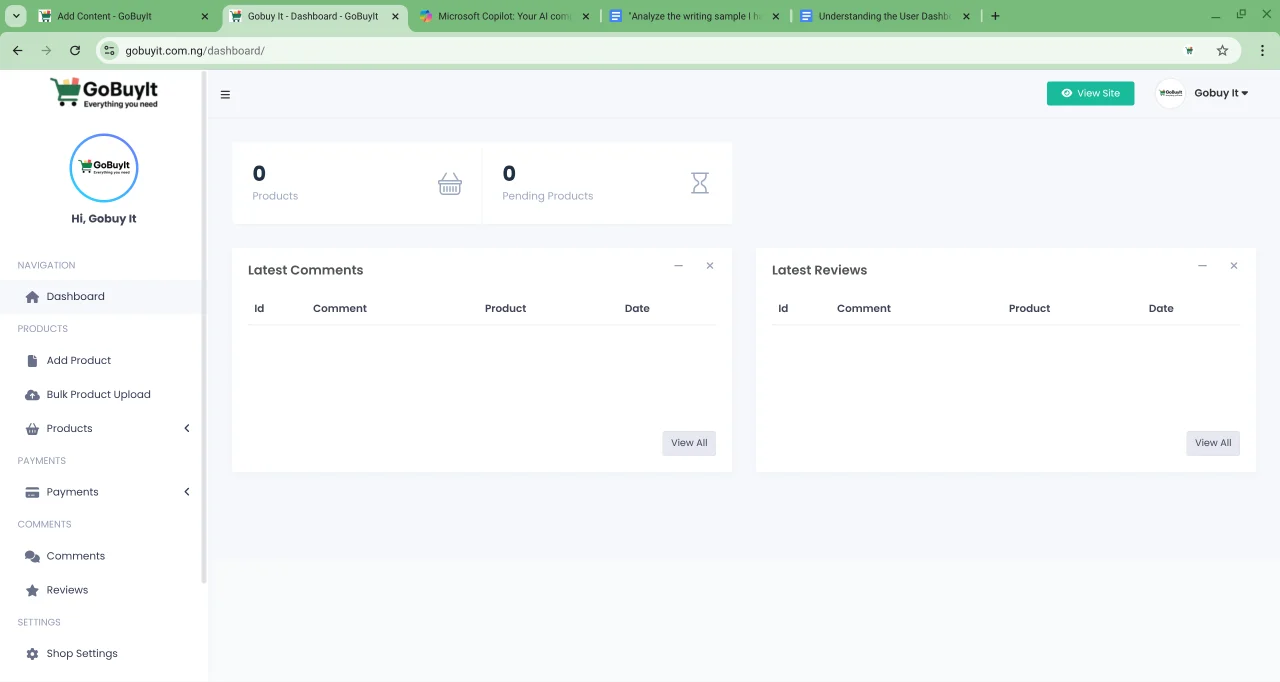
Welcome to your GoBuyIt Dashboard. This is your personal control center. It's where you manage everything — your products, payments, reviews, and more.
Let’s take a quick tour.
Start with Navigation
At the top, you’ll see a friendly greeting like Hi, GoBuy It. That’s your confirmation that you're logged in and ready to go.
On the left side of the screen (or inside the menu on mobile), you’ll find your Navigation Panel. This is where all your tools live.
Here’s what each section does:
-
Dashboard Your home base. It shows quick stats, recent activity, and shortcuts to important actions.
-
Products View all the items you’ve listed. You’ll see how many are live and how many are still pending.
-
Add Product Want to sell something new? Click here to post a fresh listing.
-
Bulk Product Upload Got a bunch of items to list? Use this to upload them all at once. It's perfect for shop owners.
-
Payments Track your payment history and see what’s been processed.
-
Comments View feedback from buyers or questions about your products.
-
Reviews See what people are saying about your shop or listings.
-
Settings Update your account details, change your password, or adjust your preferences.
-
Shop Settings Customize your shop name, logo, and contact info.
-
Shop Policies Set your rules for returns, delivery, and communication. This helps build trust with buyers.
Quick Stats at a Glance
Right below the navigation, you’ll see a snapshot of your activity:
-
Products — Total number of items you’ve listed
-
Pending Products — Items waiting for approval or review
Latest Comments and Reviews
At the bottom of your dashboard, you’ll find a feed of recent interactions:
-
Latest Comments Buyers asking questions or leaving feedback
-
Latest Reviews Ratings and comments from people who’ve bought from you
Each entry shows the ID, the comment, the product, and the date. This helps you stay on top of what’s happening.
Why it matters
Your dashboard isn’t just a bunch of buttons. It’s your business hub. Whether you’re selling one item or running a full shop, this is where you stay organized, respond to buyers, and keep things moving.
Take a few minutes to explore it. Click around. Get comfortable.
The more you use it, the smoother your GoBuyIt experience becomes.
Next up: how to post your first product. Let’s keep going.