Your shop profile is more than just a name. It’s your storefront, your brand, and your first impression. Whether you're selling one item or running a full business, setting it up properly makes a big difference.
Let’s walk through how to do it.
Start with Profile Settings
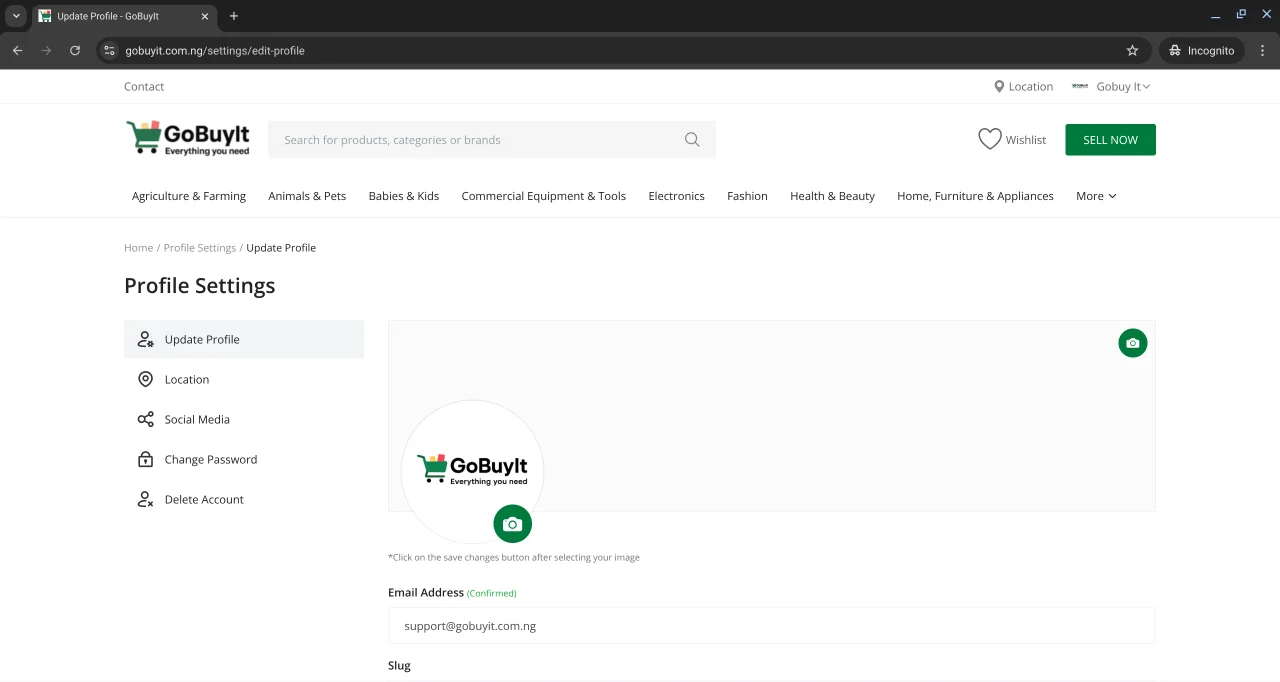
To update your personal details like your logo, banner, name, phone number, or email preferences:
-
On a laptop: Click your name at the top right corner of the page, then select Profile Settings.
-
On mobile: Tap the menu icon (three bars at the top left), tap on your name, then tap Profile Settings.
Inside this section, you can:
-
Upload your business logo and banner
-
Set your shop slug (a short, custom link for your shop)
-
Enter your name and phone number
-
Choose whether to:
-
Receive email notifications when someone sends you a message
-
Show your email address publicly
-
Show your phone number on your listings
Make sure everything looks clean and professional. This helps build trust with buyers.
Customize Your Shop Settings
To change your shop name or write a description about your business:
-
Click your name and select Dashboard
-
Scroll down to the Shop Settings section on the left menu (on a laptop)
Here’s what you’ll see:
-
Shop Name — This is the name buyers will see
-
Shop Description — Tell people what you sell, who you are, or why they should buy from you
-
RSS Feeds — You can choose to enable or disable this feature
Take your time with the description. A few honest sentences can go a long way.
Set Your VAT Rates
If you’re selling products that require tax settings, you can define VAT (Value-Added Tax) rates by country or state.
Inside Shop Settings, scroll to the VAT section. You’ll see options to:
-
Set a fixed VAT rate for all countries
-
Or define custom VAT rates by location
For example:
-
Nigeria — 0%
-
Nigeria/Lagos — 0%
-
Nigeria/Kano — 0%
-
And so on...
Important: If you set a VAT rate for a country, it applies to all states within that country. But if you want a specific state to have its own rate, you can set that separately.
Final Tip
Your shop profile is your digital storefront. Keep it clear, honest, and up to date. The better it looks, the more likely buyers are to trust you and reach out.